Hi All
I’ve uploaded the first beta of VSoft.Process, an open source (Apache 2.0 license) library for running other programs from Delphi and working with their input and output.
It supports Delphi XE2 or later and has the same API on Windows, Linux and macOS. This is a library that I wrote a few years ago (before ai) - I recently had claude give it a makeover (ie fix bugs, add more tests).
On windows it uses I/O completion ports, and epoll/kqueue on POSIX platforms - the result is very fast low overhead capture of stdout/stderr.
Installing
Using DPM
The quickest way to use it is through DPM, the Delphi package manager.
If you have the DPM IDE plugin installed, then the pack will be available in the list of packages (when include prerelease is checked) - in that case it only takes 1 click to install.
Or from the command line - In the folder that holds your project, run:
dpm install VSoft.Process -preRelease
The -preRelease switch is only needed while it’s in beta. DPM works out your Delphi version from the project, downloads VSoft.Process and its one dependency (VSoft.CancellationToken), and adds them to the project’s search path. There’s no library path to edit and nothing to copy into your source tree. When later betas come out, adding -upgrade to the same command moves you to the newest one.
If you haven’t used DPM before, it’s at GitHub - DelphiPackageManager/DPM: A Package Manager for Delphi · GitHub.
Manual install
If you’d rather not use it, the source is on GitHub: add the Source folder and VSoft.CancellationToken to your search path.
Pipe targets
Redirecting stdout and/or stderror is done by attaching pipe targets to the process. There are built in pipe targets for TStringBuilder, TStream, files, raw bytes or one line at a time, using an anonymous method, a method or a plain procedure. TPipeTarget.ToAll sends the same output to several targets at once, so you can show it to the user and write it to a log file in one go.
The line targets handle the awkward cases. A UTF-8 character split across two reads comes out intact, CRLF and LF both end a line, and progress output that uses bare CRs isn’t cut short.
Calls are serialised across stdout and stderr, so one target can be attached to both streams without any locking of your own. If a target raises an exception, the error is logged and that target gets no more data for the run. The child and the other targets carry on.
IPipeTarget is a three-method interface (Start, HandleData, Done), so writing your own, for a logger or a progress parser say, doesn’t take much.
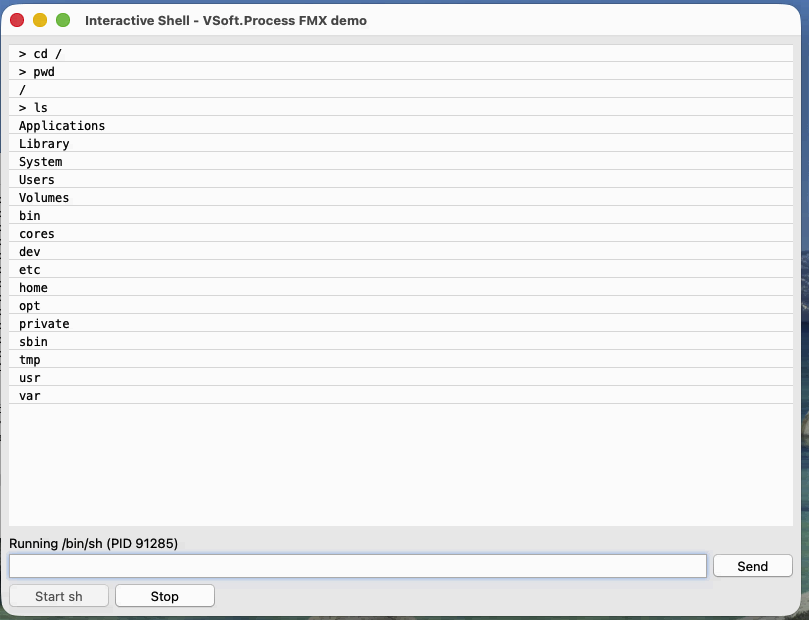
Stdin works the same way from the other side. It can come from a string, bytes, a stream or a file, or from an interactive pipe source that you write to while the child is running.
Here’s a small example: stdout goes to the console and to a file, and stderr is kept for later.
uses
  System.SysUtils,
  VSoft.Process;
var
  proc    : IProcess;
  console : IPipeTarget;
  errText : TStringBuilder;
begin
  errText := TStringBuilder.Create;
  try
    console := TPipeTarget.ToLineDelegate(
      procedure(const line : string)
      begin
        Writeln(line);
      end);

    proc := TProcess.Create;
    proc.StartInfo.Executable := 'git';
    proc.StartInfo.TimeoutInMSec := 60000;
    proc.StartInfo.OutputEncoding := TEncoding.UTF8;
    proc.CommandLine.Add('log');
    proc.CommandLine.Add('--oneline');
    proc.CommandLine.Add('-20');
    proc.WithStdOutPipe(TPipeTarget.ToAll(\[console, TPipeTarget.ToFile('gitlog.txt')\]));
    proc.WithStdErrPipe(TPipeTarget.ToStringBuilder(errText));

    if not proc.Execute then
      Writeln('Could not start git: ', proc.Errors.Text)
    else if proc.ExitCode <> 0 then
      Writeln('git failed: ', errText.ToString);
  finally
    errText.Free;
  end;
end.
What else it does
-
Three ways to run a program. Execute waits for it to finish. ExecuteAsync returns once it has started and fires OnExit when it ends. ExecuteDetached starts it and lets it go.
-
A command line builder that quotes arguments correctly on Windows. Arguments marked as sensitive, like passwords, are masked when you log the command line.
-
Add, change or remove environment variables for the child without touching your own.
-
Timeouts, plus cancellation through ICancellationToken or a TEvent.
-
Terminate stops the whole process tree. On Windows the child runs in a job object; on Linux and macOS it gets its own process group.
-
Run as a different user on Windows.
-
Everything can be set with properties, as above, or in a fluent style (WithStartInfo, WithCommandLine and so on). The README shows both for every example.
Platforms and testing
-
Windows 32 and 64 bit, Delphi XE2 to 13: well tested.
-
Linux64, Delphi 10.2 or later: well tested.
-
macOS x64 (Delphi 10.3 or later) and ARM64 (Delphi 11 or later): the code is there and compiles, but it hasn’t been tested yet, so treat it as untested for now. If you try it on a Mac, I’d like to hear how it went.
The test suite (around 250 tests) passes on Win32, Win64 and Linux (Ubuntu 24.04).
Links
It’s a beta, so bug reports and feedback on the API are welcome, here or as GitHub issues.