Hi All, thought I would put this one to the brains trust
I am currently tasked with making an aggressive visual prompt on a screen to capture attention to an event occurrence and am looking for ideas that do it… gracefully.
I have tried timers, timer threads, and good ole FlashWindow. And they just don’t come off well and look very janky.
I need to show some kind of big visual alert when something is scanned by a mobile vehicular system. It needs to be visual as this is an industrial environment, and things like audio alerts will not work.
My initial go to was a timer thread to change colour on a panel (or other component) and then back again. This is ok, save if another alert is generated in the .5 seconds the thread is running (possible) it will miss the next alert.
I could queue the threads, but thought I would throw it out there to see if someone has a more elegant solution I have not considered. I did try flashing a light from an embedded camera, but too distracting apparently.
I’m assuming this is a Windows VCL app? If it was FireMonkey you can use one of the effect components to make any part of any control attract attention in a number of ways.
However, if it’s VCL you’re a bit more limited.
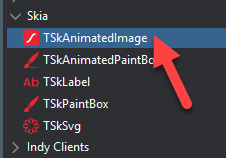
You don’t mention what version of Delphi you’re using but if it’s a fairly recent one you can use Skia4Delphi and the TskAnimatedImage control to have a Lottie animation (or something like an animated GIF - but Lotties are MUCH smaller) - and get that to attract attention.
The controls will work for VCL (they’re not as cool as FMX but they still do good things).
If you’re not using 12 or 13 you can go to Skia4Delphi.org and download the project directly and install it into the IDE. It works with XE7 upwards.
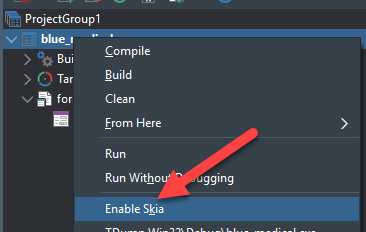
Just by enabling Skia you get an immediate speed and quality boost in graphics rendering but you can also then have a lovely Lottie animation which you simply make visible/invisible when you need to grab your user’s attention. You can get the Lottie animations (mostly for free) from https://lottiefiles.com and other places on the Internet.
The only downside is you may have to deploy the sk4d.dll with your exe unless you are using a version with static binding. It’s a tiny file and you just need to have it where the exe is - simple as that.
can you queue the alerts? that way once one is dismissed you can check if the queue is NOT(Empty) and show the next one
could you cover the entire screen with a message communicating the alert (a form on top works, with some transparency so the app beneath is still visible) with an [ACKNOWLEDGE] type button?
you could also have a timer on that alert form so that alerts are displayed at the same time, with +/- [ACKNOWLEDGE] buttons for each one or one for all of them or…
I would use another timer as a retriggerable one-shot timer. Each event resets and enables that timer and when the timer triggers it simply disables itself.
That timer then controls the start / stop of the actual blink timer either directly, a post message or via a flag.