Just wanted to enquire as to why stock standard FMX compile includes the tracker and ads of:
Google Firebase Analytics, and
Google AdMob (ads).
I produce totally free, no ad software compiled by FMX Delphi Community Edition. I state the apps are free, no ads, no trackers, on my website (www.hakasoft.com).
Yet a user complained that “Aurora AppWarden” (an open source Tracker Logger app scanner)" stated my aps contained the above 2 trackers (Firebase abd AdMob).
To check, I downloaded “AppWarden”" and sure enough it found the above 2 trackers.
I then did a file search of my Delphi project directory, for “Firebase.google” and “admob.google”, and yes those words were found in the “.dex” and “.so” files of the compiled app.
So SHOCK! without adding ads or trackers, the standard FMX compile still includes enough of these for App scanners to dectect the trackers!!
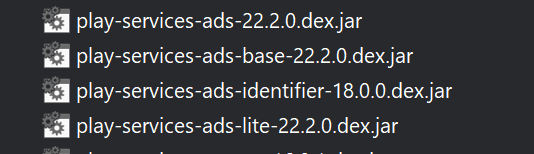
It’s probably detecting that the classes from firebase-xxxxx and play-services-ads-xxxxx jars (under the Libraries nodes of the Android platforms in Project Manager) are included. AppWarden probably cannot detect whether those classes are actually being used, so it just assumes if they’re present, they are being used.
If your app does not use those, you could disable them (right click each .jar and click Disable, for both Android 32-bit and 64-bit), and they won’t be included.
Just FYI - if you can reproduce that with a blank FMX project can you raise a ticket on QP and let us know?
We do not, by default, put people in the position of appearing to have ads/trackers/telemetry in their apps and if there is a flag which is making it look as if the app is tracking/showing ads we’d obviously want to make some changes to stop that.
Okay so I tested all my public available Apps (all Free, No Ads)
The apps being: Spice Circuit, Base Conversion, Boolean Minimiser, and KMap solver.
Aurora AppWarden discovered the following tracker / loggers in the apps:
Google Tag Manager
Google Firebase Analytics
Google Analytics
Google AdMob
So it was NOT just my Minimiser app (it only had Firebase and AdMob detected).
AppWarden found the other apps to have these 2 tracker / logger and more!
So as to your suggestion Ian, I compiled a NEW totally BLANK FMX project.
Then Aurora AppWarden discovered:
Google Firebase Analytics, and
Google AdMob
In the BLANK application !!!
Note: The blank application was created by
File - New Multidevice Application - Blank application
Then immediately: Compiled - Run (to create the APK, for both Debug and Release Builds).
Copied APK file to phone, and installed and test ran.
The Aurora AppWarden scan of the app found the BLANK application to contain the Firebase and AdMob tracker/loggers.
In Project Manager, expand the Target Platforms node. Expand each of Android 32-bit and Android 64-bit. Underneath each, you should see a Libraries node. Expand each, and the .jar files are listed. Right-click the ones that need to be disabled and click Disable (unfortunately, one-by-one)
I doubt anything would be done with such a ticket, since the solution is what I described.
So wow, lots of potentially unwanted JAR files, like:
Firebase.??? Jar’s (12 different ones)
play.services.ads??? Jar’s (10 different ones)
billing
Licencing
biometerics
Yea so now the problem is which ones do the Tracker / logger find?
As well as the Google play.services.ads I would like be happy to remove ALL Google.Play.Services!, like:
play.services.location
play.services.maps
play.services.cloud
But which are safe to disable?
Also would disabling this also effect “Google Play Protect”?
i.e. Installing the APK always throws up “Google Play Protect” warning.
For Google Firebase Analytics, it’s likely this one: firebase-measurement-connector-19.0.0.jar (contains the AnalyticsConnector class)
For Google AdMob, I’ve already mentioned the 4 that could be disabled
For Google Tag Manager and Google Analytics, it would help if AppWarden was able to give more detail about what exactly is being included.
For Tag Manager, it would mean that play-services-tagmanager-x.x.x.jar would be in the Libraries list, but of course, that one is not present at all by default.
For Google Analytics, if it is referring to the legacy analytics (apps should be migrating to Firebase Analytics, which is also not present by default), that (play-services-analytics) is not included either.
More detail is needed for these two warnings because by all appearances, AppWarden is mistaken.
Hi Charles, can you raise a ticket on our Quality Portal explaining your findings, and include some screenshots of AppWarden running and your app’s JAR settings?