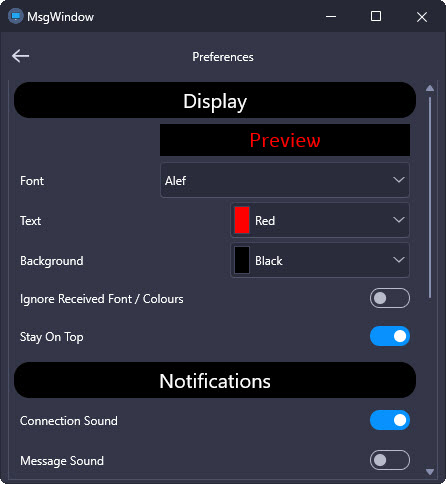
For the controls on my preferences form (actually a tab) I’m using an Align value of TopLeft and margins to lay them out at design time. At run time there may be a few options that don’t apply (Windows vs Android or some hardware not available) so I’d like to hide those options. This is easily done, but leaves gaps in the layout. I can set the Align of the invisible controls to BottomLeft which seems to work, but thought there must be a better way.
I’m not sure why you’re getting gaps, that shouldn’t happen.
Put them on a TPanel or (preferably) a TLayout and then use Top for the control alignment instead of the TopLeft. You then set the alignment on the parent panel/layout control to suit. There should be no gaps that way.
You don’t mention if your preferences list needs to scroll or not, if it does then a TPanel should not be used since it will not support inertial movement on mobile which is an important and expected behavior now for iOS and Android.
Thank Ian. I used TopLeft as using Top makes the controls full width which I don’t want. Changing the Visible property at design time does update the form correctly, but not at run time. I did just try your suggestions, but no difference. The gaps remain.
The preferences are currently in groups on a set of tabs. That TabControl is a child of one of the tabs of the main TabControl.
I’ll make a simplified sample project to see if the tabs or something else is causing the issue.
A quick test project (using an Align of TopLeft) worked fine with some buttons directly on a form, but as soon as I moved those same buttons to a tab on a TTabControl it stopped working (compacting). The same thing happens if I put them on a TLayout. If I use an Align of Top for the buttons that works everywhere, but I want controls of various widths.
If I toggle the button’s Visible property at design time all combinations work correctly so why does it fail at run time?
I’m testing all of this with Delphi 13 BTW.
Sounds like some kind of bug in the refresh/repaint logic. I can try and test this later today and see if I can work it out.
For buttons of various widths you can manipulate the left/right margins.
Thanks for looking into it. I have more to learn about layouts and margins it seems.
Well, maybe, but it could also be a bug. Unfortunately, I am in the middle of recording/editing things for the Delphi birthday webinar but as soon as I get a chance I will look into the resize issue because I am intrigued to know why it’s happening.
I ended up putting each setting (a TLabel and a TSwitch or TCombobox) on a TLayout and setting each TLayout’s Align to Top and the Margins to give enough spacing. Setting a TLayout invisible does compact the “stack” correctly so I’m happy with that. Overall it looks a lot more modern and consistent with the look of other Android apps.
Awesome. I’m glad it worked out for you.