David, I have been sweating tears of blood over coping with status and navigation bars, finding out things like which version of android does what with them, and getting programmes to run on androids from 10 to 16. There is some quite inconsistent behaviour, some of which I have managed to get around, and some I just have to live with.
Here are the tools I have put together. Where you are trying to utilise the space behind the status and navigation bars, I have been trying to put them back in, as having them obliterate buttions and squiggle over images I find unpleasant.
You may find some useful ideas, so here it is, though rather long!
Routines to allow status and navigation bars back into android programmes, after the developers made them part of the scene (dam* them!) in android 15.

Need to have in the main unit:

  StatusBarHeight, NavigationBarHeight : integer;  //Heights of these bars
  OriginalClientHeight, OriginalClientWidth : integer;  //Original client height and width - almost!
  OrientationMargins : tRect;   //Gets margins around "safe area" of screen

Need to have in each unit:

  ImageStatus, ImageNavigation : tImage;           //Images for the status and navigation bars


In Form.Create in the main programme:

   GetStatusBarHeights;   // Get the heights of the status and the navigation bars.
                          // Note that these are zero in earlier androids.

   // The Client height and Client Width available here are short by the status bar height,
   // depending on the orientation of the device.

   if ClientHeight > ClientWidth then
   begin
      OriginalClientHeight := max(ClientHeight, ClientWidth) + round(StatusBarHeight);
      OriginalClientWidth := min(ClientHeight, ClientWidth);
   end
   else
   begin
      OriginalClientHeight := max(ClientHeight, ClientWidth);
      OriginalClientWidth := min(ClientHeight, ClientWidth) + round(StatusBarHeight);
   end;


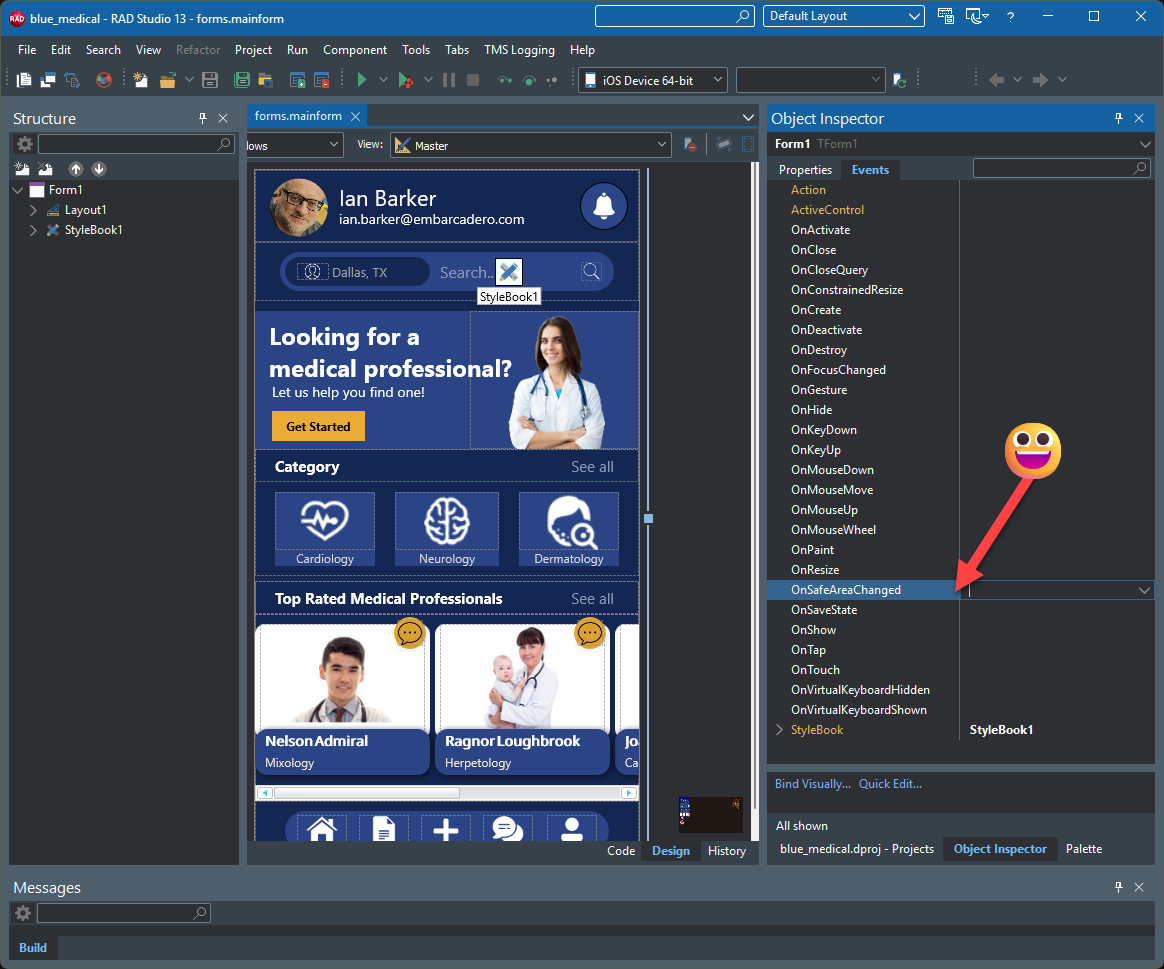
In Form.OnSafeAreaChanged in the main programme:

procedure Form.FormSafeAreaChanged(Sender: TObject; const AInsets: TRectF);
begin
   OrientationMargins.Left := round(aInsets.Left);
   OrientationMargins.Top := round(aInsets.Top);
   OrientationMargins.Right := round(aInsets.Right);
   OrientationMargins.Bottom := round(aInsets.Bottom);
end;


Need to put this at the start of each Form.Resize:

var
   CH, CW : single;  // Adjusted ClientHeight and ClientWidth
   LeftOffset : single; // For when the left has to be shifted due to the buttons
   TopOffset : single;
   Orientation : string;
   rectStatus, rectNavigation : tRectF;
begin
   Memo1.Lines.Add('Resize: ' + inttostr(ClientHeight) + ', ' + inttostr(ClientWidth));

   if ClientWidth = 0 then exit;    // Get zero in the first call, I think from the FormCreate calling.

   // Set up the parameters for the usable screen area - ie without the status and navigation bars, and
   // the top and left margins for different orientations..
   // The ClientHeight and ClientWidth arguments are no longer required (but left in so I can use this
   // routine in other programmes without having to change them all!).

   // The usable rectangle is CH x CW, with left and top margins of LeftOffset and TopOffset.
   // The rectangles are for the images used to cover the status and navigation bar areas,
   // though the navigation bar one is a bit limited as it just sits under the opacity of
   // the navigation bar rather than taking over its colour.

   SetBarDetails(F1, ImageStatus, ImageNavigation, ClientHeight, ClientWidth, CH, CW, LeftOffset, TopOffset, rectStatus, rectNavigation, Orientation);

   // The SetSizes cause the images to be written on the form on which they are called,
   // hence they have to be done here, not in SetBarDetails.  I think this is because
   // SetSize is responsible for the construction of the canvas for the image.

   ImageStatus.Bitmap.SetSize(round(rectStatus.Right), round(rectStatus.Bottom));
   ImageNavigation.Bitmap.SetSize(round(rectNavigation.Right), round(rectNavigation.Bottom));

   // Actually write the status and navigation images (only necessary in androids
   // from 15 on).

   WriteBars(ImageStatus, ImageNavigation, rectStatus, rectNavigation, Orientation);

   //Adjust some of the stuff on the screen.


And you need the following routines in the main unit:


procedure Form.GetStatusBarHeights;
var
  LID: Integer;
  LResources: JResources;
begin
  StatusBarHeight := 0;
  LResources := TAndroidHelper.Context.getResources;
  LID := LResources.getIdentifier(StringToJString('status_bar_height'), StringToJString('dimen'), StringToJString('android'));

  if LID > 0 then
    StatusBarHeight := round(LResources.getDimensionPixelSize(LID) / TAndroidHelper.DisplayMetrics.density);


  NavigationBarHeight := 0;
  LResources := TAndroidHelper.Context.getResources;
  LID := LResources.getIdentifier(StringToJString('navigation_bar_height'), StringToJString('dimen'), StringToJString('android'));

  if LID > 0 then
    NavigationBarHeight := round(LResources.getDimensionPixelSize(LID) / TAndroidHelper.DisplayMetrics.density);

    //Earlier androids may still return a nav and status bar height, though the only
    // effect they have on the "safe" area is to decrease the available height.
    // The OnSafeAreaChanges is not called in the earlier androids (<= 14)
end;


procedure tPeteAMainForm.SetBarDetails (Form : tForm; var xImageStatus : tImage; var xImageNavigation : tImage;
   FormClientHeight, FormClientWidth : integer; var CH : single; var CW : single;
   var LeftOffset : single; var TopOffset : single; var RectStatus : tRectF; var RectNavigation : tRectf;
   var Orientation : string);
// FormClient Height, FormClientWidth used to be provided by the calling form using the ClientHeight and ClientWidth parameters
// Note that they are zero on the first call, so if they are zero, do nothing.
// They are no longer used!
// CH and CW are the returned clientheight and clientwidth for where we will put our components
// LeftOffset and TopOffset are the offsets from the top and the side for where the status and navigation bars go
// RectStatus, RectNavigation contain the positions and sizes for the status bar rectangles
// - left, top for the positions, width and height for the sizes.
var
   LService: IFMXScreenService;
   tso : tScreenOrientation;
begin
   OriginalClientHeight := max(ClientHeight, OriginalClientHeight); //Sometimes get variation in this.
   FormClientHeight := OriginalClientHeight;
   FormClientWidth := OriginalCLientWidth;

   CH := FormClientHeight;
   CW := FormClientWidth;
   LeftOffset := 0;
   TopOffset := StatusBarHeight;

   if StatusBarHeight <= 0 then GetStatusBarHeights;

   //Make the status bar and navigation bar images (OK to make them here, but the
   // bitmap.setsizes must be done on the form on which the image is to be drawn.

   if xImageStatus = nil then xImageStatus := tImage.Create(Form);
   if xImageStatus.Bitmap = nil then xImageStatus.Bitmap := tBitmap.Create;
   xImageStatus.Parent := Form;

   if xImageNavigation = nil then xImageNavigation := tImage.Create(Form);
   if xImageNavigation.Bitmap = nil then xImageNavigation.Bitmap := tBitmap.Create;
   xImageNavigation.Parent := Form;

   if TPlatformServices.Current.SupportsPlatformService(IFMXScreenService, LService) then
   begin
      tso := LService.GetScreenOrientation; //This is more accurate than using ClientHeight and CLientWidth

      case tso of     // These were more for debugging that usefulne3ss, but here they are anyway.
         tScreenOrientation.Portrait:           Orientation := 'Portrait';
         tScreenOrientation.Landscape:          Orientation := 'Landscape';
         tScreenOrientation.InvertedPortrait:   Orientation := 'InvertedPortrait';
         tScreenOrientation.InvertedLandscape:  Orientation := 'InvertedLandscape';
      end;


   if not TOSVersion.Check(15) then
   begin
      //Here, StatusBarHeight and NavigationBarHeight are both zero!

      if (tso = tScreenOrientation.Landscape) or (tso = tScreenOrientation.InvertedLandscape) then
      begin
         CH := min(ClientHeight, ClientWidth);      //Different versions of android give different values!
         CW := max(ClientHeight, ClientWidth);
      end
      else
      begin
         CH := max(ClientHeight, ClientWidth);
         CW := min(ClientHeight, ClientWidth);
      end;

      CH := CH - NavigationBarHeight - StatusBarHeight;

      LeftOffset := 0;
      TopOffset := 0;

      RectStatus := tRectF.Create(100, 100, 200, 200);      // These were necessary for debugging, and have been left in
      RectNavigation := tRectF.Create(100, 100, 200, 200);  // as no doubt there will be further debugging needed!

      exit;
   end;


      if (tso = tScreenOrientation.Portrait) or (tso = tScreenOrientation.InvertedPortrait) or
         ( (OrientationMargins.Left = 0) and (OrientationMargins.Right = 0) ) then
      begin
      //Here, the bars are top and bottom, with nothing on either side.

         if (tso = tScreenOrientation.Portrait) or (tso = tScreenOrientation.InvertedPortrait) then
         begin

         // PORTRAIT - status bar on top, clientwidth, nav bat on bottom, ibid.

            CH := FormClientHeight - StatusBarHeight - NavigationBarHeight;

            RectStatus.Left := 0;
            RectStatus.Top := 0;
            RectStatus.Right := CW;
            RectStatus.Bottom := StatusBarHeight;

            RectNavigation.Left := 0;
            RectNavigation.Top := FormClientHeight - NavigationBarHeight;
            RectNavigation.Right := CW;
            RectNavigation.Bottom := NavigationBarHeight;
         end
         else
         begin

         // LANDSCAPE - but still with top and bottom bars.

            CH := FormClientWidth - StatusBarHeight - NavigationBarHeight;
            CW := FormCLientHeight;

            RectStatus.Left := 0;
            RectStatus.Top := 0;
            RectStatus.Right := CW;
            RectStatus.Bottom := StatusBarHeight;

            RectNavigation.Left := 0;
            RectNavigation.Top := FormClientWidth - NavigationBarHeight;
            RectNavigation.Right := CW;
            RectNavigation.Bottom := NavigationBarHeight;
         end;
      end
      else
      begin

      //Landscape or InvertedLandscape, with navigation bar to one side.

         if tso = tScreenOrientation.Landscape then  //Landscape - rotated to the left
         begin
            Orientation := 'Landscape';

            FormClientHeight := OriginalClientWidth;
            FormClientWidth := OriginalCLientHeight;

            // Status bar at the top; navigation bar on the right.

            CH := FormClientHeight - StatusBarHeight;
            CW := FormClientWidth - NavigationBarHeight;

            //Status bar image position X, Y:  0,0
            //Status bar image size  StatusBarHeight, ClientHeight

            RectStatus.Left := 0;
            RectStatus.Top := 0;
            RectStatus.Right := FormClientWidth;
            RectStatus.Bottom := StatusBarHeight;;

            //Navigation bar image position X, Y: 0, ClientHeight - NavigationBarHeight
            //Navigation bar image size ClientWidth NavigationBarHeight

            RectNavigation.Left := FormClientWidth - NavigationBarHeight;
            RectNavigation.Top := 0;
            RectNavigation.Right := NavigationBarHeight;
            RectNavigation.Bottom := FormClientWidth;
         end;

         if tso = tScreenOrientation.InvertedLandscape then //Landscape - rotated to the right
         begin
            Orientation := 'InvertedLandscape';

            //Status bar at the top; Navigation bar on the left.

            FormClientHeight := OriginalClientWidth;
            FormClientWidth := OriginalCLientHeight;

            CW := FormClientWidth - NavigationBarHeight;
            CH := FormClientHeight - StatusBarHeight;
            LeftOffset := NavigationBarHeight;

            RectStatus.Left := 0;
            RectStatus.Top := 0;
            RectStatus.Right := FormClientWidth;
            RectStatus.Bottom := StatusBarHeight;

            RectNavigation.Left := 0;
            RectNavigation.Top := 0;
            RectNavigation.Right := NavigationBarHeight;
            RectNavigation.Bottom := FormClientWidth;
         end;
      end;
   end;

   //Set the positions and the sizes of the images.

   xImageStatus.Position.X := RectStatus.Left;
   xImageStatus.Position.Y := RectStatus.Top;
   xImageStatus.Width := RectStatus.Right;
   xImageStatus.Height := RectStatus.Bottom;

   xImageNavigation.Position.X := RectNavigation.Left;
   xImageNavigation.Position.Y := RectNavigation.Top;
   xImageNavigation.Width := RectNavigation.Right;
   xImageNavigation.Height := RectNavigation.Bottom;
end;


procedure Form.WriteBars (var ImageStatus : tImage; var ImageNavigation : tImage;
   var RectStatus : tRectF; var RectNavigation : tRectf; var Orientation : string);

//I don't know if this idea is valid, but it comes from an earlier version using CLientHeight and ClientWidth:
// The ClientHeight and ClientWidth appear to be defined for each form - hence they have to be passed as
// arguments to this routine or otherwise you get the values for this form, which are just held over from when
// this form was last active - and may have nothing to do with the values for the current form!

var
   rect : tRectF;
   brush : tBrush;
   s : string;
begin
   if not tOsVersion.Check(15) then exit;   //Not needed if android < 15

   brush := tBrush.Create(tBrushKind.solid, tAlphaColorRec.Red);///.Black);

   // Draw the status bar

   rect := tRectF.Create(0, 0, RectStatus.Right, RectStatus.Bottom);
   ImageStatus.Bitmap.Canvas.BeginScene;
   ImageStatus.Bitmap.Canvas.FillRect(rect, 1, brush);
   ImageStatus.Bitmap.Canvas.EndScene;

   //Now for the navigation bar

   brush.Color := tAlphaColorRec.Springgreen;

///   rect := tRectF.Create(0, 0, 100, 100);
   rect := tRectF.Create(0, 0, RectNavigation.Right, RectNavigation.Bottom);
   ImageNavigation.Bitmap.Canvas.BeginScene;
   ImageNavigation.Bitmap.Canvas.FillRect(rect, 1, brush);
   ImageNavigation.Bitmap.Canvas.EndScene;

   brush.Destroy;
end;