I have downloaded all the Kastri stuff, and would like to have it in a form where I do not have to individually add every wretched file to a programme, but just have them in the USES list .
I have the files in c:\delphi\KastriLib, and have added that path to
Options/Enviionment Variables\User System Overdrives\Path, but to no avail.
Where should I put it please?
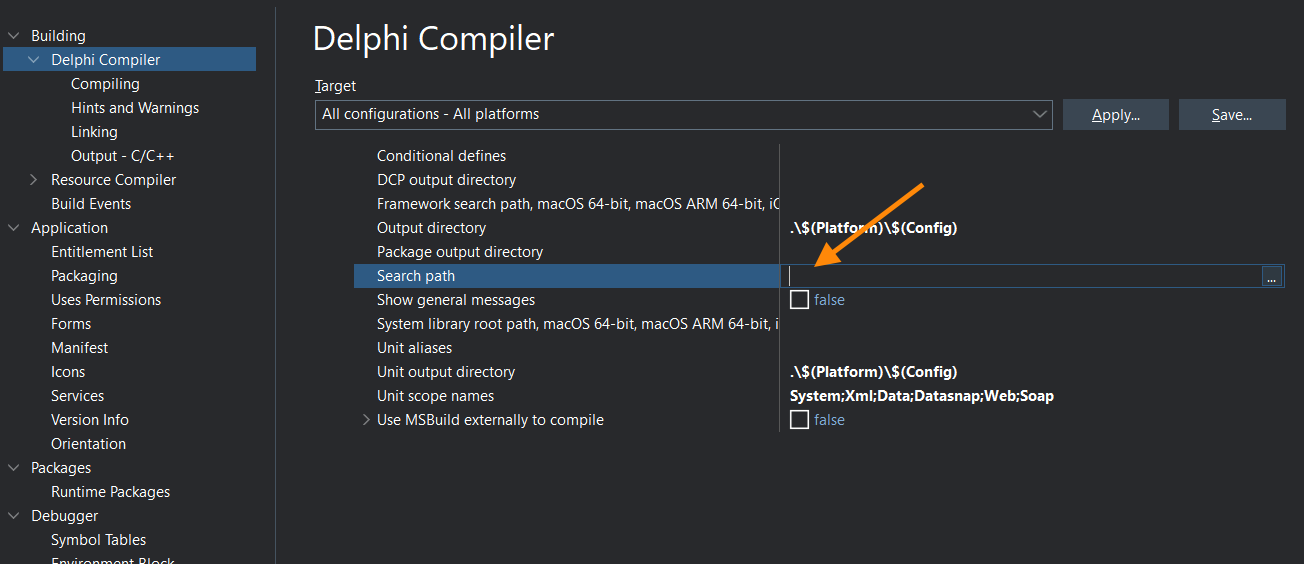
Like any application, paths to source files are either in the Search path value in the project options:
Or in the IDE library path:
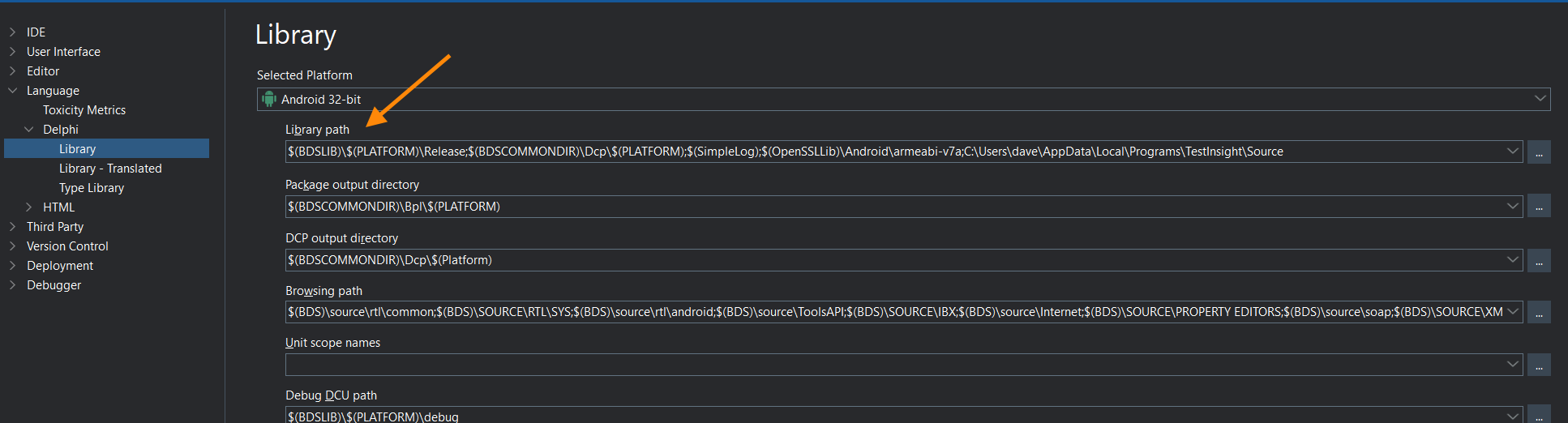
Though it’s recommended to use the latter for compiled source.
If you have a folder path as a User System Override, you can use that value as a macro in the project options, e.g.

I have put DW.ServiceManager.Android.pas into project/add to project.
I have put c:\delphi\Kastrilib into project/options/delphicompiler / search path, and
into tools/options/language/delphi/library
It shows up in the “projects” panel, under .... KastriLib, along with DW.FusedLocation.Android.pas
BUT
on compiling, it still comes up with
[DCC Fatal Error] ABLS.ServiceModule.pas(11): F2613 Unit ‘DW.ServiceManager.Android’ not found.
Where do I go now?
The Kastri units are all prefixed with DW.* so just find that unit in the Kastri source and add that folder to the library path too.
I did, as above, to no avail.
I think I wiill scrap the library attempts, and just go back to putting the “USES” files, one at a time, in the directory where the programme resides. Trouble is, the linked list can go on to a dozen or more files, and it gets pretty tedious, but if it has to be done, it will be.
Why not just paste your path from the IDE and someone will tell you what you’re doing wrong?
Be sure to post the current compile error message you’re getting too.
Ii’ll give that a go. I copied every DW*.pas to the directory. Everything was found and it compiled OK, but later gave the message
\delphi\PeteA\ABLSticky\Service\Android\Debug\ABLStickyService.jar’.
- and it’s not in Kastri.
Sigh!
You misread my post. You don’t copy the Kastri files into your project, you add the folder containing those files to the IDE search path as Dave showed you. Delete all the Kastri files from your project, having them there is only likely to cause you problems.
Once you’ve deleted all the Kastri files from your project folder post a screenshot showing the same screen as Dave did earlier so we can see your path and also post the current compile error message.
Here are the paths. No, I did not misread your post, but what I had tried, after Dave’s missive, got me nowhere!
Project/Options/Delphi Compiler/Search Path:
Target: Debug Configuration - Android 64-bit platform
Inherits from the various other places:
c:\delphi\KastriLib;....\API;....\Core;....\Features\Location
Tools/Options/Language/Delphi/Library
$(BDSLIB)$(PLATFORM)\Release
$(BDSCOMMONDIR)\Dcp$(PLATFORM)
c:\delphi\KastriLib
Tools/Options/IDE/Environment Variables
C:\Program Files\Eclipse Adoptium\jdk-21.0.7.6-hotspot\bin;C:\Program Files (x86)\Embarcadero\Studio\37.0\bin;C:\Users\Public\Documents\Embarcadero\Studio\37.0\Bpl;C:\Program Files (x86)\Embarcadero\Studio\37.0\bin64;C:\Users\Public\Documents\Embarcadero\Studio\37.0\Bpl\Win64;C:\Program Files\Eclipse Adoptium\jdk-17.0.9.9-hotspot\bin;C:\Program Files (x86)\Embarcadero\Studio\23.0\bin;C:\Users\Public\Documents\Embarcadero\Studio\23.0\Bpl;C:\Program Files (x86)\Embarcadero\Studio\23.0\bin64;C:\Users\Public\Documents\Embarcadero\Studio\23.0\Bpl\Win64;C:\WINDOWS\system32;C:\WINDOWS;C:\WINDOWS\System32\Wbem;C:\WINDOWS\System32\WindowsPowerShell\v1.0;C:\WINDOWS\System32\OpenSSH;C:\Program Files (x86)\Common Files\Propellerhead Software\ReWire;C:\Program Files\Common Files\Propellerhead Software\ReWire;C:\Program Files (x86)\Common Files\Acronis\SnapAPI;C:\Program Files (x86)\Common Files\Acronis\VirtualFile;C:\Program Files (x86)\Common Files\Acronis\VirtualFile64;C:\Program Files (x86)\Common Files\Acronis\FileProtector;C:\Program Files (x86)\Common Files\Acronis\FileProtector64;C:\Program Files\PuTTY;C:\Users\Chester\AppData\Local\Microsoft\WindowsApps;c:\Delphi\KastriLib;
Some of these lose the KastriLib entry between runs.
You’re probably overcomplicating things somehow as Kastri is a really simple library to start using. If I were installing it on a new PC right now I would just
- download it and expand it to my preferred location
C:\Lib\Kastri - update my IDE library path with a few Kastri folders for the various platforms
Here’s a screenshot of that path from a VM that has not much else on it besides Kastri. You’ll want the references to the Core and API folders but you probably won’t want the reference to Firebase.
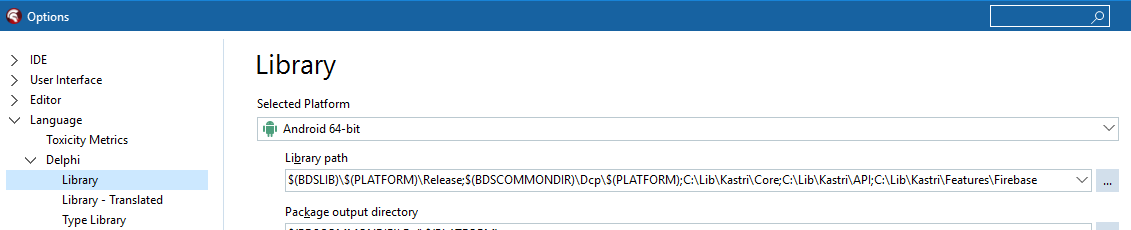
With this VM configured exactly as I’ve just described above (and no other steps) I’ve just compiled the C:\Lib\Kastri\Demos\ABLSticky projects without error.
If you post again please be sure to provide the full compiler error message. If you right click on the error message you’ll see there’s an option there to copy it in full.
You meant that? Here it is:
Checking project dependencies…
Compiling ABLSticky.dproj (Debug, Android64)
brcc32 command line for “ABLSticky.vrc”
c:\program files (x86)\embarcadero\studio\37.0\bin64\cgrc.exe -c65001 -= resinator.exe ABLSticky.vrc -foABLSticky.res
dccaarm64 command line for “ABLSticky.dpr”
c:\program files (x86)\embarcadero\studio\37.0\bin\dccaarm64.exe -$O- -$R+ -$Q+ --no-config -M -Q -TX.so
-AGenerics.Collections=System.Generics.Collections;Generics.Defaults=System.Generics.Defaults -DDEBUG;;FRAMEWORK_FMX -E.\Android64\Debug
-I"c:\program files (x86)\embarcadero\studio\37.0\lib\Android64\debug";....\API;....\Core;....\Features\Location;“c:\program files
(x86)\embarcadero\studio\37.0\lib\Android64\Release”;C:\Users\Public\Documents\Embarcadero\Studio\37.0\Dcp\Android64;C:\delphi\KastriLib
-LEC:\Users\Public\Documents\Embarcadero\Studio\37.0\Bpl\Android64 -LNC:\Users\Public\Documents\Embarcadero\Studio\37.0\Dcp\Android64
-NU.\Android64\Debug -NSSystem;Xml;Data;Datasnap;Web;Soap; -O....\API;....\Core;....\Features\Location;“c:\program files
(x86)\embarcadero\studio\37.0\lib\Android64\Release”;C:\Users\Public\Documents\Embarcadero\Studio\37.0\Dcp\Android64;C:\delphi\KastriLib -R....\API;
....\Core;....\Features\Location;“c:\program files (x86)\embarcadero\studio\37.0\lib\Android64\Release”;
C:\Users\Public\Documents\Embarcadero\Studio\37.0\Dcp\Android64;C:\delphi\KastriLib -U"c:\program files
(x86)\embarcadero\studio\37.0\lib\Android64\debug";....\API;....\Core;....\Features\Location;“c:\program files
(x86)\embarcadero\studio\37.0\lib\Android64\Release”;C:\Users\Public\Documents\Embarcadero\Studio\37.0\Dcp\Android64;C:\delphi\KastriLib
–compiler-rt:C:\Users\Public\Documents\Embarcadero\Studio\37.0\CatalogRepository\AndroidSDK-37.0.57242.3601\ndk\27.1.12297006\toolchains\llvm\prebuilt\windows-x86_64\lib\clang\18\lib\linux\libclang_rt.builtins-aarch64-android.a
–libpath:C:\Users\Public\Documents\Embarcadero\Studio\37.0\CatalogRepository\AndroidSDK-37.0.57242.3601\ndk\27.1.12297006\toolchains\llvm\prebuilt\windows-x86_64\sysroot\usr\lib\aarch64-linux-android\23;
C:\Users\Public\Documents\Embarcadero\Studio\37.0\CatalogRepository\AndroidSDK-37.0.57242.3601\ndk\27.1.12297006\toolchains\llvm\prebuilt\windows-x86_64\sysroot\usr\lib\aarch64-linux-android
–linker:C:\Users\Public\Documents\Embarcadero\Studio\37.0\CatalogRepository\AndroidSDK-37.0.57242.3601\ndk\27.1.12297006\toolchains\llvm\prebuilt\windows-x86_64\bin\ld.lld.exe
-V -VN -NO.\Android64\Debug ABLSticky.dpr
[DCC Hint] DW.LocationPermissions.Android.pas(102): H2443 Inline function ‘TAndroidHelper.GetJActivity’ has not been expanded because unit ‘Androidapi.JNI.App’ is not specified in USES list
[DCC Hint] DW.LocationPermissions.Android.pas(102): H2443 Inline function ‘StringToJString’ has not been expanded because unit ‘Androidapi.JNI.JavaTypes’ is not specified in USES list
[DCC Hint] Unit1.pas(66): H2443 Inline function ‘StringToJString’ has not been expanded because unit ‘Androidapi.JNI.JavaTypes’ is not specified in USES list
[DCC Hint] Unit1.pas(71): H2443 Inline function ‘StringToJString’ has not been expanded because unit ‘Androidapi.JNI.JavaTypes’ is not specified in USES list
[DCC Hint] Unit1.pas(71): H2443 Inline function ‘JStringToString’ has not been expanded because unit ‘Androidapi.JNI.JavaTypes’ is not specified in USES list
Success
Elapsed time: 00:00:05.8
Deploy
paclient command line
c:\program files (x86)\embarcadero\studio\37.0\bin\paclient.exe -u8
–Clean=“.\Android64\Debug\ABLSticky,C:\delphi\PeteA\ABLSticky\ABLSticky.@emb.tmp”
[MSBuild Error] The “CreateAndroidManifestFile” task failed unexpectedly.
System.IO.DirectoryNotFoundException: Could not find a part of the path ‘C:\delphi\PeteA\ABLSticky\Service\Android\Debug\ABLStickyService.jar’.
at System.IO.__Error.WinIOError(Int32 errorCode, String maybeFullPath)
at System.IO.FileStream.Init(String path, FileMode mode, FileAccess access, Int32 rights, Boolean useRights, FileShare share, Int32 bufferSize, FileOptions options, SECURITY_ATTRIBUTES secAttrs, String msgPath, Boolean bFromProxy, Boolean useLongPath, Boolean checkHost)
at System.IO.FileStream..ctor(String path, FileMode mode, FileAccess access, FileShare share, Int32 bufferSize, FileOptions options, String msgPath, Boolean bFromProxy, Boolean useLongPath, Boolean checkHost)
at System.IO.StreamReader..ctor(String path, Encoding encoding, Boolean detectEncodingFromByteOrderMarks, Int32 bufferSize, Boolean checkHost)
at System.IO.StreamReader..ctor(String path)
at Borland.Build.Tasks.Shared.CreateAndroidManifestFile.GetAndroidService(String JarFile)
at Borland.Build.Tasks.Shared.CreateAndroidManifestFile.WriteServicesStr()
at Borland.Build.Tasks.Shared.CreateAndroidManifestFile.genManifestFile()
at Borland.Build.Tasks.Shared.CreateAndroidManifestFile.Execute()
at Microsoft.Build.BuildEngine.TaskEngine.ExecuteInstantiatedTask(EngineProxy engineProxy, ItemBucket bucket, TaskExecutionMode howToExecuteTask, ITask task, Boolean& taskResult)
Failed
Elapsed time: 00:00:00.4
So I can see you’re compiling the application fine now but the error is a deployment issue.
I tried to deploy the example and I get the same error
[MSBuild Error] The "CreateAndroidManifestFile" task failed unexpectedly.
System.IO.DirectoryNotFoundException: Could not find a part of the path 'C:\Lib\Kastri\Demos\ABLSticky\Service\Android\Debug\ABLStickyService.jar'.
So your Kastri library installation is likely fine and the issue is probably just with this particular example.
Android services aren’t something I know a lot about though sorry so I’m going to have to leave this one for someone else to assist you with. We’ve isolated it down though to a point where someone who knows what they’re doing will likely be able to tell you exactly what you’re missing.
Thanks for your efforts!
Thanks for the extra documentation, I’d suggest a minor modification
After this, you can compile/deploy the app for 64-bit.
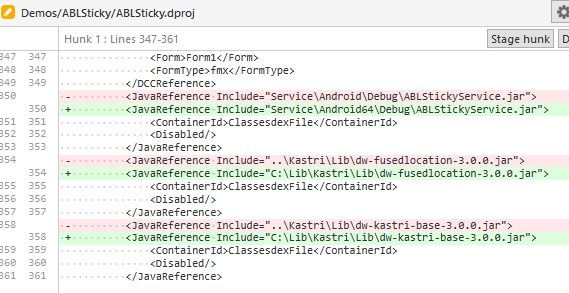
There were still a few minor issues with the ABLSticky.dproj I had to overcome to get it deployed to my device.
First up the ABLSticky.dproj is looking for the ABLStickyService.jar in the \Service\Android folder not the \Service\Android64 folder that the IDE builds to.
Secondly the relative paths in ABLSticky.dproj to the two DW jar files are incorrect.
@Chester the IDE doesn’t make it easy to fix these issues. I recommend you load up ABLSticky.dproj into a text editor (be sure it isn’t also loaded in the IDE) and make the following changes using paths applicable to your machine.