Hi there, I am trying to move components, etc. from Delphi 10.3 to 10.4.2. I have used the migration tool to export the settings from 10.3 to an ‘.idesettings’ file. After I successfully (i.e. no errors) import these settings to 10.4.2, none of the components or tools that were in 10.3 are available in 10.4.2. Is my espectation that tools and components will be moved between versions misplaced… or must I reinstall all third party products individually? An example would be FastReports. Any advice appreciated. Thanks, Kim.
The migration tool is unfortunately not very good (tried to say worse than that but the forum censored me  ) - you are better off manually copying across settings.
I don’t believe it does components anyway due to the fact that they need to be recompiled for the newer compiler version.
Oh, buggar… thx Vincent.
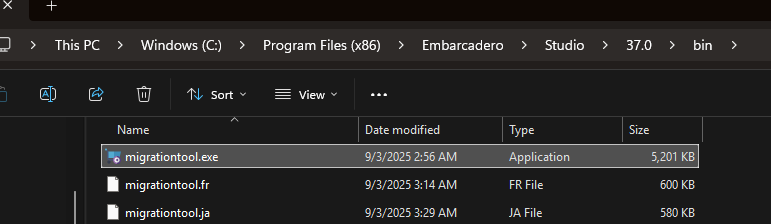
Just wanted to record somewhere that the migration tool isn’t where its stated.
You can search for it in Windows taskbar. I have 5, all called Migration Tool.  Even when I run it, it doesn’t tell me what version its for. So, I can play Russian Roulette.
Or you can look in the folder
C:\ProgramData\Microsoft\Windows\Start Menu\Programs\Embarcadero RAD Studio 12
Is not in the bin folder of the installation at all. That would have been too easy.
I havent started using D13 yet just because I have been too lazy to migrate my settings. I decided to give the migration tool another go.
It failed everytime with
Backing up settings from registry...
An invalid character was found in text content.
Line: 2299
<Setting Name="OnlySaveParamsAction" Dat
If I knew which file it was talking about, maybe I could edit it.
Also, by default (when I say yes to GetIt packages), it has Delphi updates checked. Maybe the Dev team can remove them, and anything else that may be version specific.
Have you installed any patches? I seem to remember something in the October patch about weird path issues for some people.
I just installed the patches. Still no luck.
I tracked down the registry entry for the error and deleted it in D12, not what I really wanted to do. It found another one, I deleted that one and then it found the third.
I noticed that they all belonged to gexperts. so, I unticked gexperts while migrating, the migration happened.
However
- It tried to load gexperts and failed catastrophically.
- After two tries, it moved forward and started complainig about 290 bpls, from D12. I just had to laboriously say - do not load again
- D13 now starts up
- It copied over my projects, and Delphi options - but not the desktops. So, almost there.
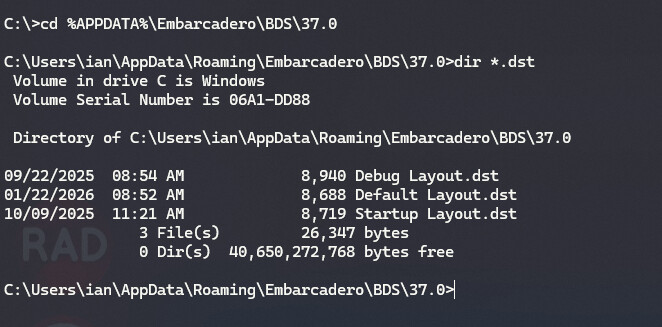
Where are the desktops stored ? Can I copy them over myself?