More android 10 vs 14 GPS problems

I have put together a sample programme for a problem with Android 10, which fails to get GPS data and cannot take pictures.
The permissions have been correctly set up.
The programme from which the sample has been taken works fine on Android 14 and 15, but not on 10. This demo only handles GPS data, not photos.

https://59b7770ca3fb18e4e90d-52e2682744779750b5103bbecf998085.ssl.cf2.rackcdn.com/GPSTest.zip

Any ideas please?

Well, I have tried to cut down the GPS problem to bedrock, and hope I may have succeeded.
This is as small as I can get it, and it now crashes on both android 10 and android 15.

The start button runs:
if FFusedLocation = nil then
FFusedLocation := TFusedLocation.Create(Self, true);
FFusedLocation.Start(FFOpt);

and after successfully navigating this it crashes
in Androidapi.JNI.Location.pas, libe 1227:

function TAndroidWindowHandle.TFormViewListener.onTouchEvent(event: JMotionEvent): Boolean;
begin
Result := FOwner.MotionManager.HandleMotionEvent(event);
end;

with a strange box labelled “Source file not found rtti_raw_invoke.s”

The source is on
https://59b7770ca3fb18e4e90d-52e2682744779750b5103bbecf998085.ssl.cf2.rackcdn.com/GPSProblem.zip

Just a polite tip - attaching zip files of source is a really bad idea. Most of us will not be prepared to download zip files due to the rare but not impossible chance the zip file contains something that could affect our systems.

Far better to share it on something like GitHub (you can make it private and then invite people to respond and add them to the repo if necessary) or you can share it as a GitHub Gist: https://gist.github.com which will allow you to keep it semi-secret but allow anyone with the link to view the code.

At Embarcadero and Idera it would be considered bad practice to download a zip file from a public source without taking a number of steps to protect our machine and exhausting all other possibilities first. From some sources it may even be blocked by our IT.

Your AndroidManifest.template.xml file is missing a metadata entry, as per earlier discussions.

Ian, Where can I find instructions on how to use Github? I have only used it once, to download Kastri, and found it quite an unfriendly platform, no doubt due to unfamiliarity. Has anyone put together manual, or is it a matter of getting in, trying multiple ideas until one works?

I put it in:

<%provider%>
<%application-meta-data%>

<%uses-libraries%>

but it made no difference.

It did here. This is what the modified file looks like here:

<?xml version="1.0" encoding="utf-8"?>
<!-- BEGIN_INCLUDE(manifest) -->
<manifest xmlns:android="http://schemas.android.com/apk/res/android"
    xmlns:tools="http://schemas.android.com/tools"
    package="%package%"
    android:installLocation="%installLocation%"
    android:versionCode="%versionCode%"
    android:versionName="%versionName%" >

    <uses-sdk
        android:minSdkVersion="%minSdkVersion%"
        android:targetSdkVersion="%targetSdkVersion%" />

<%uses-permission%>
    <uses-feature
        android:glEsVersion="0x00020000"
        android:required="true" />

    <queries>
<%queries-child-elements%>
    </queries>

    <application
        android:debuggable="%debuggable%"
        android:hardwareAccelerated="%hardwareAccelerated%"
        android:icon="%icon%"
        android:label="%label%"
        android:largeHeap="%largeHeap%"
        android:persistent="%persistent%"
        android:requestLegacyExternalStorage="true"
        android:resizeableActivity="true"
        android:restoreAnyVersion="%restoreAnyVersion%"
        android:theme="%theme%" >
<%provider%>
<%application-meta-data%>
        <meta-data android:name="com.google.android.gms.version" android:value="12451000" />
<%uses-libraries%>
        <!-- Trigger Google Play services to install the backported photo picker module. -->
        <service
            android:name="com.google.android.gms.metadata.ModuleDependencies"
            android:enabled="false"
            android:exported="false"
            tools:ignore="MissingClass" >
            <intent-filter>
                <action android:name="com.google.android.gms.metadata.MODULE_DEPENDENCIES" />
            </intent-filter>

            <meta-data
                android:name="photopicker_activity:0:required"
                android:value="" />
        </service>
<%services%>
        <!--
             Our activity is a subclass of the built-in NativeActivity framework class.
             This will take care of integrating with our NDK code.
        -->
        <activity
            android:name="com.embarcadero.firemonkey.FMXNativeActivity"
            android:configChanges="orientation|keyboard|keyboardHidden|screenSize|screenLayout|uiMode"
            android:exported="true"
            android:label="%activityLabel%"
            android:launchMode="singleTask" >

            <!-- Tell NativeActivity the name of our .so -->
            <meta-data
                android:name="android.app.lib_name"
                android:value="%libNameValue%" />

            <intent-filter>
                <action android:name="android.intent.action.MAIN" />

                <category android:name="android.intent.category.LAUNCHER" />
            </intent-filter>
        </activity>
<%activity%>
<%receivers%>
    </application>
</manifest>
<!-- END_INCLUDE(manifest) -->

I recommend watching this video: https://www.youtube.com/watch?v=v5gnvDUWqFM

I use GitHub Desktop (which this video recommends). It will make your life a lot easier.

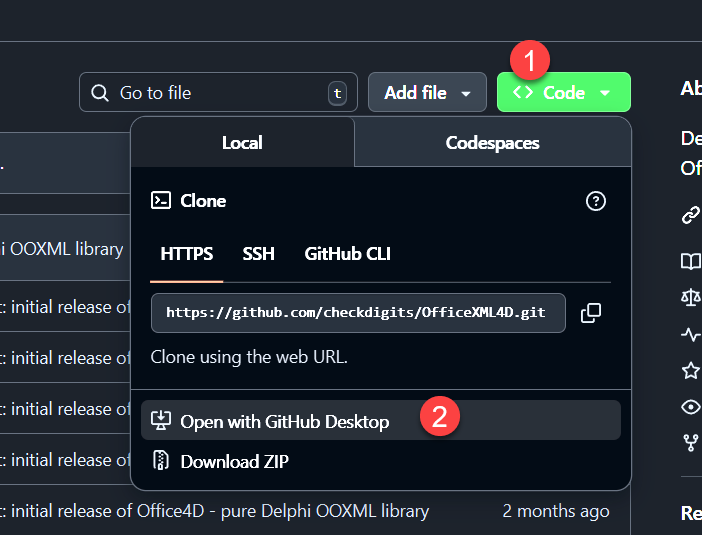
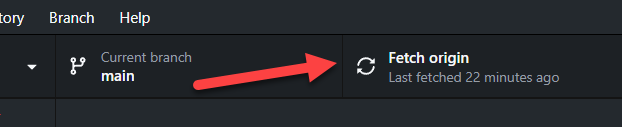
The key steps are:

  1. Install GitHub Desktop
  2. Find a repo you like
  3. Click on the green CODE button’s dropdown
  4. Select “open in GitHub Desktop”

  1. In GH Desktop select “clone” - make sure it gets copied to somewhere you like. Remember where it went to. :wink:
  2. and then “Fetch Origin”

That’s it - a copy of the repo is now on your local machine. Now you can do what you like with it.

If you want to make your own online copy of the repo to which you make changes and save those back - use “fork” from the repository menu.

But watch the video, it shows you how to do it all. Once the penny drops it’s not too difficult.

1 Like

Now it works on Android 15, but still does not work on Android 10.

Your demo works OK on Android 10, at least for me.

That’s scarey! At the same time, my Delphi has decided not to use my splash screen (though the “icons” page looks properly set up), and I get occasional error messages from the debugger asking me to send the log files (what and where are these?) to Embarcadero.

Looks as though I will have to completely reinstal Delphi again, re-download and reinstal Kastri, and see if any of that helps. I’ll get back to you in a week.